Installer, driver and SDK
Start with the installer when you want to try a demo. Use the SDK when you want to write your own app.
- Installer
- Run this program to install the driver and try the demo.
- Driver
- Windows loads the driver's
.sysfiles so an app can work with a supported real or virtual device. - SDK
- The code and examples for calling the driver from your app.
Try a driver in Windows
- Pick your edition. Use its matching Setup download below.
- Run setup as administrator. For a ZIP, extract it first. Choose Install in graphical setup, or follow the Interception V2 command.
- Restart if setup asks. Open the example linked from the project page and follow its first test.
Switching between Interceptor editions that cover the same devices? Uninstall the old edition and restart before running the new setup.
See the Install button
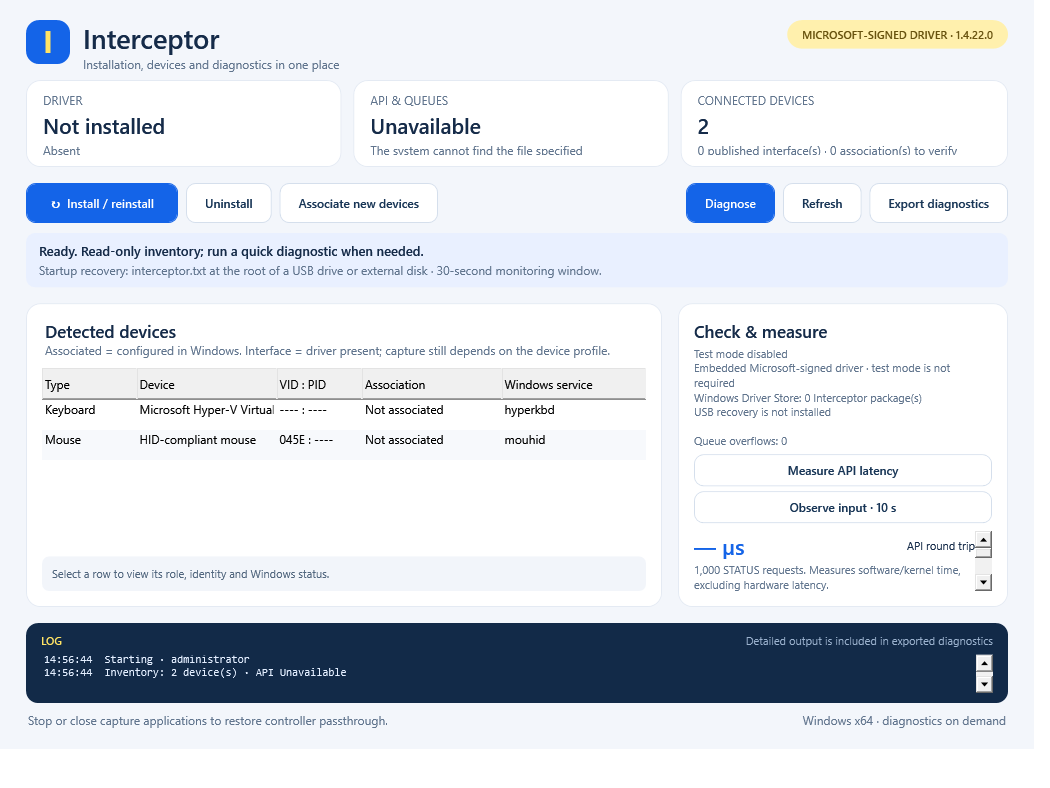
Downloads by edition
| Edition | Try it | Build an app |
|---|---|---|
| Interceptor | Setup download | C++17 · x64 SDK archive · Test source |
| Interceptor Keyboard & Mouse | Setup download | C++17 · x64 SDK archive · Test source |
| Interceptor Gamepad & Controller | Setup download | C++17 · x64 SDK archive · Test source |
| Vdevice | Setup download | C++17 · x64 SDK archive · Test source |
| Interception V2 | Full ZIP Then open install-interception.exe | C · x86 / x64 SDK archive · Test source |
| Titan Audio Link | Full ZIP Then open TitanAudioLinkSetup.exe | C++17 · x64 SDK archive · Test source |
Windows 11 test results for the three Interceptor demos and Vdevice. The published console installers passed installation, restart and a read-only SDK query in an administrator session. After uninstall and restart, Windows removed the driver service and the query returned the expected Windows 2.
Vdevice demo 1.0.6.1 passed a later Windows 11 SDK check. Release 1.0.4.1 also passed the signed upgrade and local activation-readiness checks. See the latest Vdevice test results.
Build the first SDK check
Install Visual Studio 2022 with Desktop development with C++, CMake 3.20+ and Python 3.10+. Extract the first SDK checks ZIP, open PowerShell in that folder and run one command.
python scripts/test_first_sdk.py vdevice --runThe script checks the exact archive’s SHA-256, compiles the sample and runs it. Replace vdevice with the edition ID in the integration manifest. Use --arch x86 for the Interception V2 32-bit library.
- For Interceptor or Vdevice, Driver answered confirms the status query. Windows 2 means this check could not find the driver interface.
- For Interception V2, the result is 10 keyboard slots and 10 mouse slots without a driver. These are library positions. To list connected devices later, use the separate inventory example, which opens a context and starts its demo allowance.
- For Titan Audio Link, 0 Titan endpoints is normal before installation. The check counts Titan audio inputs and outputs without playing or recording sound.
The supplied first checks do not capture input, create virtual devices or start a demo timer. The driver’s package version and the API version printed by a sample are separate values.
For an existing C++ app, use the header and implementation from the same SDK archive. Interception V2 uses an import library and a DLL instead of an implementation file. Put the DLL for your app’s architecture beside its executable. The manifest gives each exact filename.
The manifest lists each edition’s compilation definitions, including the Unicode settings needed by the Windows C++ SDKs. It includes the SHA-256 of every installer, example and SDK download. See how to check a downloaded file.
For automated VM tests, demo.console_setup gives the exact file, install and uninstall arguments, restart exit code and verification record.
Find packages for Python, Node.js, .NET and PowerShell.
See the independent manifest test. A separate consumer built and ran seven configurations using only the public integration JSON and its downloads.